---
title: Using VenuePilot's Guest List
description: Quickly add guests to your event list by manually entering names or uploading a CSV spreadsheet.
---
[Skip to content](https://support.venuepilot.co/knowledge/using-guest-list#main-content)
English
Show submenu for translations

Open main navigation
Close main navigation
- English
Show submenu for translations
- Contact us
Contact us
Search our Knowledge Base
- There are no suggestions because the search field is empty.
1. [VenuePilot Support](https://support.venuepilot.co/knowledge?hsLang=en)
2. [Manage Events](https://support.venuepilot.co/knowledge/manage-events?hsLang=en)
3. [Ticketing](https://support.venuepilot.co/knowledge/manage-events?hsLang=en#ticketing)
# Using VenuePilot's Guest List
## Quickly add guests to your event list by manually entering names or uploading a CSV spreadsheet.
Use VenuePilot's Guest List feature to have your guests **automatically show up in the Attendee List in the [VenuePilot Box Office App,](https://support.venuepilot.co/knowledge/use-the-venuepilot-app-to-sell-and-scan-tickets?hsLang=en)** as well as the**[Will Call List](https://support.venuepilot.co/knowledge/training-106-managing-and-exporting-will-call?hsLang=en)** for your event!
*❗Note: The VP Guest List **does NOT send PDF tickets**. If you wish to send PDFs, we suggest creating a **[Comp Ticket Type.](https://support.venuepilot.co/knowledge/create-comp-tickets-creating-complimentary-tickets-there-are-two-ways-to-create-a-comped-ticket-in-venuepilot.-the-first-is-to-create-a-unique-discount-1627597382062?hsLang=en)***
### Manually Adding Entires
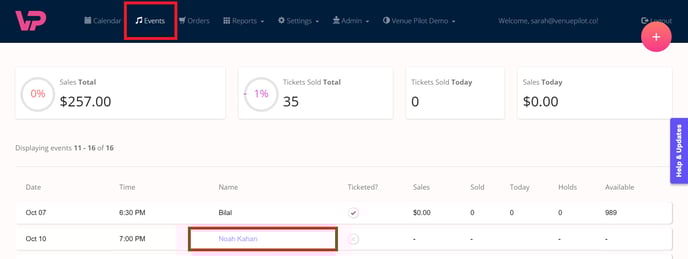
- **Navigate to events** in the **top menu, and click into the event name** where you would like to add your guests.
- Click on **"Add Guest List"**
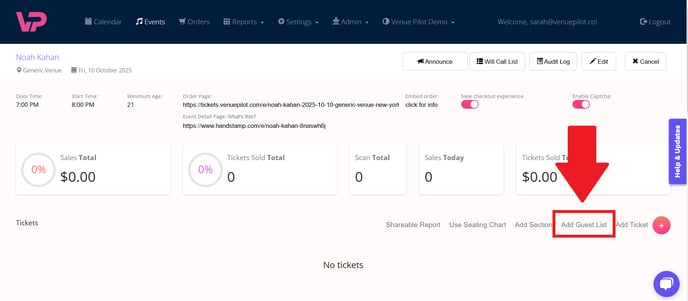
***🔎Quick Tip:** The fastest way to find the term "Add Guest List"? Simply press **CTRL + F on your keyboard** to open a search box.*
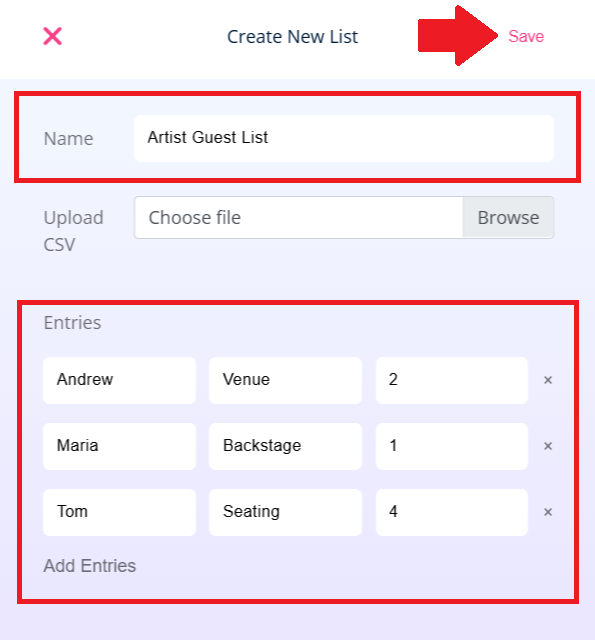
- In the modal, **give your guest list a name.**
- You can begin manually adding **First and Last Names**
- Clicking **'Add Entries' **will give you multiple boxes to add guests' names
- Make sure to **save your list in the top right before navigating away!**
### Uploading Entries by CSV
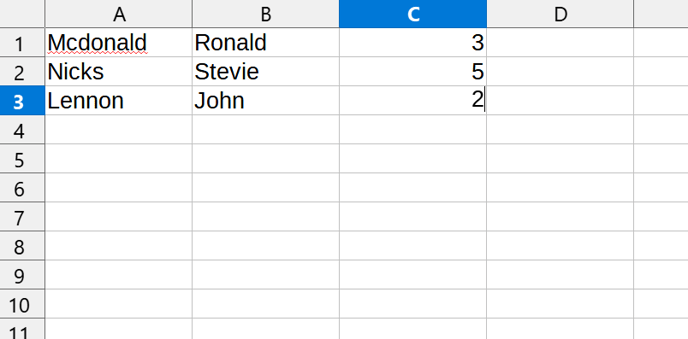
- First, make sure to **format your CSV file EXACTLY as listed below:**
- **Three columns, with NO header**
- Last Name
- First Name
- Quantity
- Cells cannot be blank in a row!
- Ensure to save file as a CSV
**Sample CSV:**
- In the modal, **select the 'browse button' to select your CSV.**
- Upload your list by clicking **save in the top right before navigating away!**
- You will be able to return to your event page and refresh to see the progress of your guest list upload.
- Click the **pencil icon ✏️to add or remove guests** from your list.

***❗NOTE: Uploading additional CSVs will continue to add to the Guest List.** Please ensure there are no unwanted duplicate names as you upload sheets, as this will result in duplicate entries*
🆘Still need help? Reach out to us @ **clientsupport@venuepilot.co**
- [Ticket Buyers](https://support.venuepilot.co/knowledge/ticket-buyers?hsLang=en)
- [Get Started with VenuePilot](https://support.venuepilot.co/knowledge/get-started-with-venuepilot?hsLang=en#main-content)
- [Onboarding](https://support.venuepilot.co/knowledge/get-started-with-venuepilot?hsLang=en#onboarding)
- [Calendar](https://support.venuepilot.co/knowledge/calendar?hsLang=en)
- [Manage Events](https://support.venuepilot.co/knowledge/manage-events?hsLang=en#main-content)
- [Email Confirmations](https://support.venuepilot.co/knowledge/manage-events?hsLang=en#email-confirmations)
- [Access & Discount Codes](https://support.venuepilot.co/knowledge/manage-events?hsLang=en#access-discount-codes)
- [Ticketing](https://support.venuepilot.co/knowledge/manage-events?hsLang=en#ticketing)
- [Event Management](https://support.venuepilot.co/knowledge/manage-events?hsLang=en#event-management)
- [Templates & Budgets](https://support.venuepilot.co/knowledge/manage-events?hsLang=en#templates-budgets)
- [Marketing](https://support.venuepilot.co/knowledge/marketing?hsLang=en#main-content)
- [Pixels](https://support.venuepilot.co/knowledge/marketing?hsLang=en#pixels)
- [Box Office & Scanning](https://support.venuepilot.co/knowledge/box-office-scanning?hsLang=en#main-content)
- [Box Office Reporting](https://support.venuepilot.co/knowledge/box-office-scanning?hsLang=en#box-office-reporting)
- [Selling](https://support.venuepilot.co/knowledge/box-office-scanning?hsLang=en#selling)
- [Scanning](https://support.venuepilot.co/knowledge/box-office-scanning?hsLang=en#scanning)
- [Reports](https://support.venuepilot.co/knowledge/reports?hsLang=en)
- [Hardware & IT](https://support.venuepilot.co/knowledge/hardware-it?hsLang=en)
- [Integrations](https://support.venuepilot.co/knowledge/integrations?hsLang=en)
- [Website integrations](https://support.venuepilot.co/knowledge/website-integrations?hsLang=en)
- [VenuePilot University: Producing and Managing Independent Events](https://support.venuepilot.co/knowledge/venuepilot-university-producing-and-managing-independent-events?hsLang=en)
- [Announcements](https://support.venuepilot.co/knowledge/announcements?hsLang=en)
[](http://venuepilot.com)
[mailto:info@venuepilot.co](mailto:info@venuepilot.co)
Copyright © 2026, VenuePilot