---
title: Your Guide to Passkeys on VenuePilot
description: Security doesn't have to be a headache. At VenuePilot, we’ve integrated Passkeys to give you a login experience that is both faster and significantly more secure than traditional passwords.
---
[Skip to content](https://support.venuepilot.co/knowledge/your-guide-to-passkeys-on-venuepilot#main-content)
English
Show submenu for translations

Open main navigation
Close main navigation
- English
Show submenu for translations
- Contact us
Contact us
Search our Knowledge Base
- There are no suggestions because the search field is empty.
1. [VenuePilot Support](https://support.venuepilot.co/knowledge?hsLang=en)
2. [Get Started with VenuePilot](https://support.venuepilot.co/knowledge/get-started-with-venuepilot?hsLang=en)
# Your Guide to Passkeys on VenuePilot
## Security doesn't have to be a headache. At VenuePilot, we’ve integrated Passkeys to give you a login experience that is both faster and significantly more secure than traditional passwords.
### What are Passkeys?
A passkey is a digital credential tied to your device (like your phone, laptop, or tablet). Instead of memorizing a complex string of characters, you use your device’s existing security—like a **fingerprint, face scan, or screen lock PIN**—to sign in.
### Why use a Passkey?
- **Superior Security:** Passkeys are resistant to phishing. Unlike passwords, they can’t be guessed or stolen in a data breach because the "secret" stays safely on your device.
- **Ultimate Convenience:** Forget the "Forgot Password" link. Logging in is as simple as unlocking your phone.
- **No More Typing:** Say goodbye to long, complicated passwords and two-factor authentication codes.
---
### How to Set Up Your Passkey
Adding a passkey to your VenuePilot account takes less than a minute. Follow these steps:
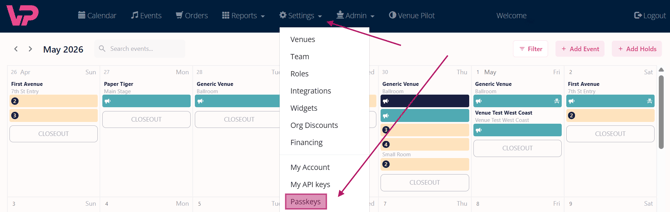
1. **Log In:** Sign into your VenuePilot account as you normally would.
2. **Navigate to Settings:** Head over to **Settings** and select the **Passkeys** tab.
3. **Register:** Click the button labeled **"Register New Passkey."**
4. **Name Your Key:** You will be prompted to give your passkey a name.
> **Pro Tip:** We recommend naming it something memorable, such as *"My Work Laptop"* or *"iPhone 15,"* so you can easily manage your keys later.
1. **Browser Prompt:** Your browser will show a pop-up asking to save the passkey. All modern browsers (Chrome, Safari, Edge, Firefox) fully support this process. Follow the on-screen instructions to confirm your identity (via TouchID, FaceID, or PIN).
---
### Logging In with Your Passkey
Once your passkey is saved, your login flow becomes seamless:
- Go to the VenuePilot login page.
- Click **"Sign in with Passkey."**
- Verify your identity on your device.
- **You’re in!** No password required.
By switching to passkeys, you're choosing a future where your account is safer and your workflow is smoother.
- [Ticket Buyers](https://support.venuepilot.co/knowledge/ticket-buyers?hsLang=en)
- [Get Started with VenuePilot](https://support.venuepilot.co/knowledge/get-started-with-venuepilot?hsLang=en#main-content)
- [Onboarding](https://support.venuepilot.co/knowledge/get-started-with-venuepilot?hsLang=en#onboarding)
- [Calendar](https://support.venuepilot.co/knowledge/calendar?hsLang=en)
- [Manage Events](https://support.venuepilot.co/knowledge/manage-events?hsLang=en#main-content)
- [Email Confirmations](https://support.venuepilot.co/knowledge/manage-events?hsLang=en#email-confirmations)
- [Access & Discount Codes](https://support.venuepilot.co/knowledge/manage-events?hsLang=en#access-discount-codes)
- [Ticketing](https://support.venuepilot.co/knowledge/manage-events?hsLang=en#ticketing)
- [Event Management](https://support.venuepilot.co/knowledge/manage-events?hsLang=en#event-management)
- [Templates & Budgets](https://support.venuepilot.co/knowledge/manage-events?hsLang=en#templates-budgets)
- [Marketing](https://support.venuepilot.co/knowledge/marketing?hsLang=en#main-content)
- [Pixels](https://support.venuepilot.co/knowledge/marketing?hsLang=en#pixels)
- [Box Office & Scanning](https://support.venuepilot.co/knowledge/box-office-scanning?hsLang=en#main-content)
- [Box Office Reporting](https://support.venuepilot.co/knowledge/box-office-scanning?hsLang=en#box-office-reporting)
- [Selling](https://support.venuepilot.co/knowledge/box-office-scanning?hsLang=en#selling)
- [Scanning](https://support.venuepilot.co/knowledge/box-office-scanning?hsLang=en#scanning)
- [Reports](https://support.venuepilot.co/knowledge/reports?hsLang=en)
- [Hardware & IT](https://support.venuepilot.co/knowledge/hardware-it?hsLang=en)
- [Integrations](https://support.venuepilot.co/knowledge/integrations?hsLang=en)
- [Website integrations](https://support.venuepilot.co/knowledge/website-integrations?hsLang=en)
- [VenuePilot University: Producing and Managing Independent Events](https://support.venuepilot.co/knowledge/venuepilot-university-producing-and-managing-independent-events?hsLang=en)
- [Announcements](https://support.venuepilot.co/knowledge/announcements?hsLang=en)
[](http://venuepilot.com)
[mailto:info@venuepilot.co](mailto:info@venuepilot.co)
Copyright © 2026, VenuePilot