---
title: Sharing your Calendar Availability
description: Sharing availability on your VenuePilot calendar
---
[Skip to content](https://support.venuepilot.co/knowledge/sharing-your-calendar-availability#main-content)
English
Show submenu for translations

Open main navigation
Close main navigation
- English
Show submenu for translations
- Contact us
Contact us
Search our Knowledge Base
- There are no suggestions because the search field is empty.
1. [VenuePilot Support](https://support.venuepilot.co/knowledge?hsLang=en)
2. [Manage Events](https://support.venuepilot.co/knowledge/manage-events?hsLang=en)
3. [Event Management](https://support.venuepilot.co/knowledge/manage-events?hsLang=en#event-management)
# Sharing your Calendar Availability
## Copy holds from your calendar to send to an artist's team
Finding open dates for promoters or clients usually means opening your calendar, manually checking for conflicts, and typing out lists line by line.The **Share Availability** tool does all that heavy lifting for you. In just a few clicks, you can choose a date range on a calendar, filter out specific days of the week, and export a clean list of open dates ready to paste straight into an email or DM.
### How does it Work?
You can generate your availability list either from a desktop or a mobile device.
#### **On Desktop**
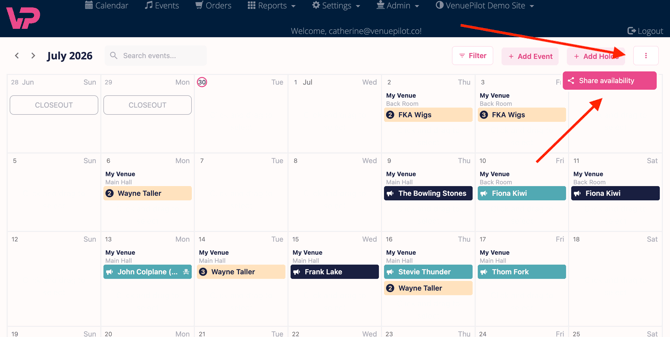
Click the **kebab menu (three dots)** in the upper right corner of your screen and select **Share Availability**.
#### On Mobile
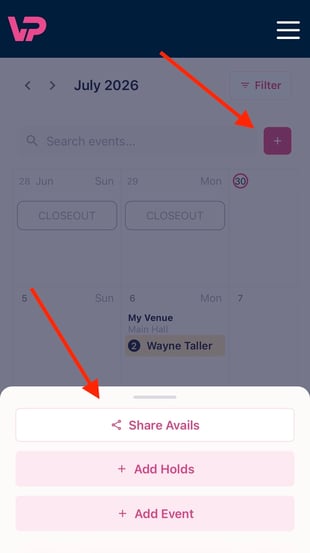
Tap the **+ (plus) button** and select **Share Avails**.
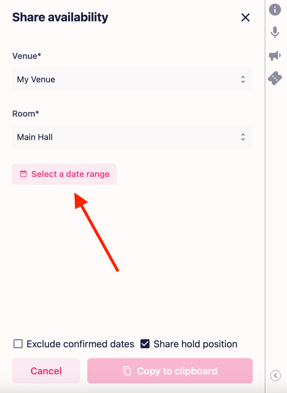
**1. Select your venue and room:** Choose the specific venue and/or room you are looking to book. The system will pull calendar data specifically for this.
**2. Pick your date range:** Use the **Calendar Picker** to choose your custom start and end dates.
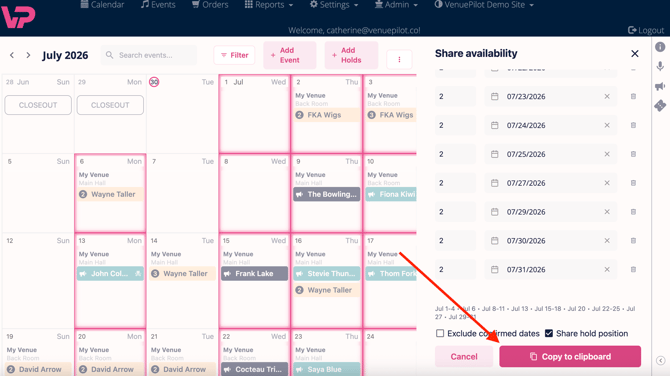
**3. Apply your filters:** Fine-tune your list by toggling off booked shows or deselecting specific days of the week so you only send the exact days you want to fill (see filtering options below).
**4. Export and share:** Click the **Copy** button. A professionally formatted list of your available dates is instantly copied to your clipboard, ready to paste into a text, DM, or email.
#### Custom Filters
To save you from manually deleting dates from your exported text, use these built-in filters before you hit copy:
- **Exclude Confirmed Events:** Toggle this option **ON** to automatically hide any dates that already have a booked show at that venue. You'll never accidentally offer a date that is already taken.
- **Day-of-Week Selection:** Looking specifically for weekend holds or specific weeknight combos? Inside the range selector, simply **deselect** the days of the week you don't want. For example, if you only want to share *Tuesdays and Thursdays in July*, uncheck Monday, Wednesday, Friday, Saturday, and Sunday to narrow your list down instantly.
- **Share Hold Position.** Choose whether you want to include the hold number along with your copied dates, or deselect it for more discretion.
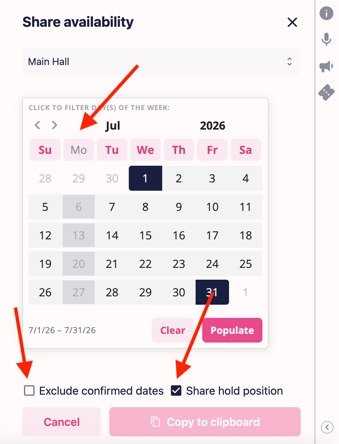
**Tip:** You can combine these filters. For example, you can select the entire month of October, uncheck weekdays, and turn on "Skip Confirmed Events" to get a clean list of *only available weekends* in seconds.
Questions? Reach out using the chat bubble or contact us at clientsupport@venuepilot.com.
- [Ticket Buyers](https://support.venuepilot.co/knowledge/ticket-buyers?hsLang=en)
- [Get Started with VenuePilot](https://support.venuepilot.co/knowledge/get-started-with-venuepilot?hsLang=en#main-content)
- [Onboarding](https://support.venuepilot.co/knowledge/get-started-with-venuepilot?hsLang=en#onboarding)
- [Calendar](https://support.venuepilot.co/knowledge/calendar?hsLang=en)
- [Manage Events](https://support.venuepilot.co/knowledge/manage-events?hsLang=en#main-content)
- [Email Confirmations](https://support.venuepilot.co/knowledge/manage-events?hsLang=en#email-confirmations)
- [Access & Discount Codes](https://support.venuepilot.co/knowledge/manage-events?hsLang=en#access-discount-codes)
- [Ticketing](https://support.venuepilot.co/knowledge/manage-events?hsLang=en#ticketing)
- [Event Management](https://support.venuepilot.co/knowledge/manage-events?hsLang=en#event-management)
- [Templates & Budgets](https://support.venuepilot.co/knowledge/manage-events?hsLang=en#templates-budgets)
- [Marketing](https://support.venuepilot.co/knowledge/marketing?hsLang=en#main-content)
- [Pixels](https://support.venuepilot.co/knowledge/marketing?hsLang=en#pixels)
- [Box Office & Scanning](https://support.venuepilot.co/knowledge/box-office-scanning?hsLang=en#main-content)
- [Box Office Reporting](https://support.venuepilot.co/knowledge/box-office-scanning?hsLang=en#box-office-reporting)
- [Selling](https://support.venuepilot.co/knowledge/box-office-scanning?hsLang=en#selling)
- [Scanning](https://support.venuepilot.co/knowledge/box-office-scanning?hsLang=en#scanning)
- [Reports](https://support.venuepilot.co/knowledge/reports?hsLang=en)
- [Hardware & IT](https://support.venuepilot.co/knowledge/hardware-it?hsLang=en)
- [Integrations](https://support.venuepilot.co/knowledge/integrations?hsLang=en)
- [Website integrations](https://support.venuepilot.co/knowledge/website-integrations?hsLang=en)
- [VenuePilot University: Producing and Managing Independent Events](https://support.venuepilot.co/knowledge/venuepilot-university-producing-and-managing-independent-events?hsLang=en)
- [Announcements](https://support.venuepilot.co/knowledge/announcements?hsLang=en)
[](http://venuepilot.com)
[mailto:info@venuepilot.co](mailto:info@venuepilot.co)
Copyright © 2026, VenuePilot