---
title: Setting Up and Utilizing Best Available Seating
description: Venue Pilot’s Best Available feature makes purchasing reserved seating tickets easier and faster than ever. Instead of manually navigating a seat map, ticket buyers can instantly find and cart the best seats for their group with a single click.
---
[Skip to content](https://support.venuepilot.co/knowledge/setting-up-and-using-best-available-seating#main-content)
English
Show submenu for translations

Open main navigation
Close main navigation
- English
Show submenu for translations
- Contact us
Contact us
Search our Knowledge Base
- There are no suggestions because the search field is empty.
1. [VenuePilot Support](https://support.venuepilot.co/knowledge?hsLang=en)
2. [Manage Events](https://support.venuepilot.co/knowledge/manage-events?hsLang=en)
3. [Ticketing](https://support.venuepilot.co/knowledge/manage-events?hsLang=en#ticketing)
# Setting Up and Utilizing Best Available Seating
## The Best Available feature on seating charts makes purchasing reserved seating tickets easier and faster than ever. Instead of manually navigating a seat map, ticket buyers can instantly find and cart the best seats for their group with a single click.
**How Best Available Works**
Best Available works automatically once your seating chart meets a few simple conditions.
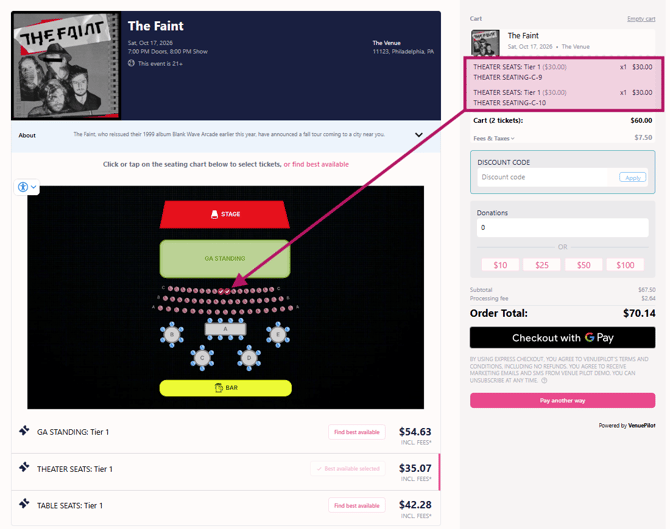
When a customer opts to use Best Available, the system evaluates open inventory and automatically selects and carts the best seats based on proximity to your map's **focal point** and the buyer's requested ticket quantity.
**Requirements & Setup**
Best Available requires no manual toggling to activate, provided your seating chart meets the following rules:
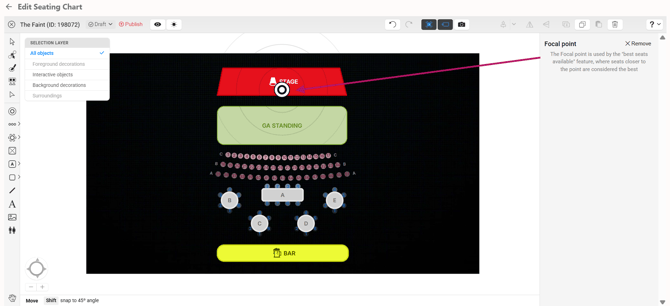
1. **A Focal Point Must Be Set:** Your seating chart must have a defined focal point. This tells the system how to rank the "best" seats.
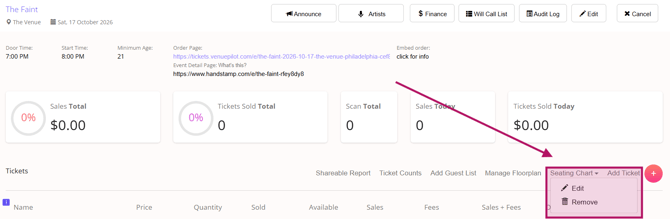
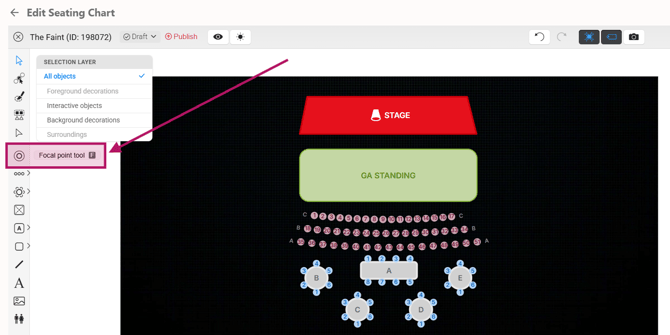
1. **How to set it:** Edit your seating map from the "Seating Chart" link on the ticketing page for your event. Use the "focal point" tool to place the focal point on your layout. While this is generally placed on the main stage, it can be set anywhere depending on your venue's unique configuration.
1. **No "Bookable as a Whole" Seating:** The chart cannot contain tables or sections configured as "bookable as a whole."
1. **Note:** If your seating chart lacks a focal point or contains "bookable as a whole" seating, the Best Available option will ***automatically** **be hidden from buyers***.
**The Ticket Buyer Experience**
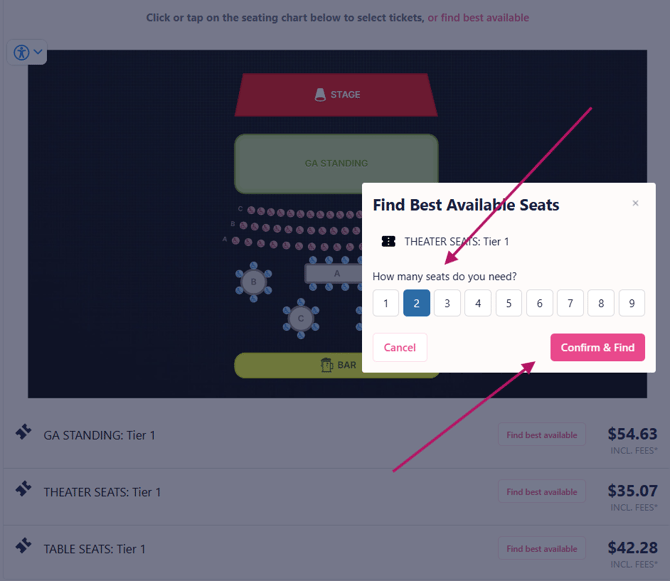
Customers have two seamless ways to purchase using Best Available:
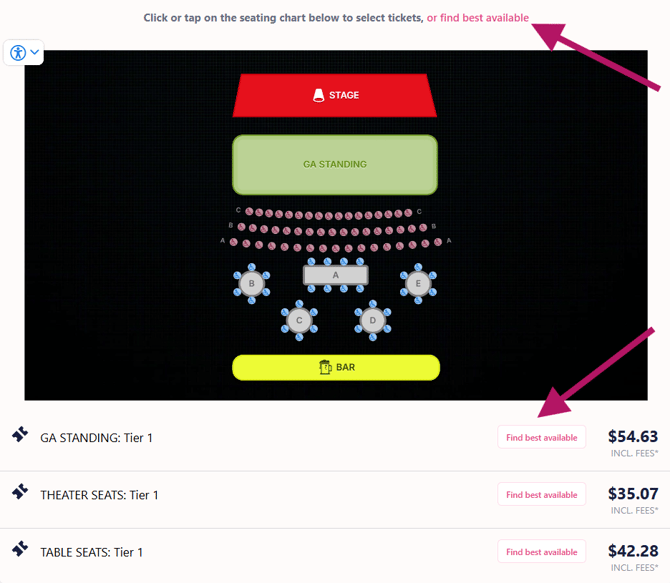
- **From the Map View:** Customers can click the **Find Best Available** button located at the top of the seating map.
- **From the Ticket List:** Below the seating chart, customers can simply click the **Find Best Available** button next to their desired ticket type or section.
**Need Assistance?**
If you need help setting a focal point on your map or ensuring your seating chart is properly configured for Best Available, please reach out to the Venue Pilot support team, we’re happy to help!

- [Ticket Buyers](https://support.venuepilot.co/knowledge/ticket-buyers?hsLang=en)
- [Get Started with VenuePilot](https://support.venuepilot.co/knowledge/get-started-with-venuepilot?hsLang=en#main-content)
- [Onboarding](https://support.venuepilot.co/knowledge/get-started-with-venuepilot?hsLang=en#onboarding)
- [Calendar](https://support.venuepilot.co/knowledge/calendar?hsLang=en)
- [Manage Events](https://support.venuepilot.co/knowledge/manage-events?hsLang=en#main-content)
- [Email Confirmations](https://support.venuepilot.co/knowledge/manage-events?hsLang=en#email-confirmations)
- [Access & Discount Codes](https://support.venuepilot.co/knowledge/manage-events?hsLang=en#access-discount-codes)
- [Ticketing](https://support.venuepilot.co/knowledge/manage-events?hsLang=en#ticketing)
- [Event Management](https://support.venuepilot.co/knowledge/manage-events?hsLang=en#event-management)
- [Templates & Budgets](https://support.venuepilot.co/knowledge/manage-events?hsLang=en#templates-budgets)
- [Marketing](https://support.venuepilot.co/knowledge/marketing?hsLang=en#main-content)
- [Pixels](https://support.venuepilot.co/knowledge/marketing?hsLang=en#pixels)
- [Box Office & Scanning](https://support.venuepilot.co/knowledge/box-office-scanning?hsLang=en#main-content)
- [Box Office Reporting](https://support.venuepilot.co/knowledge/box-office-scanning?hsLang=en#box-office-reporting)
- [Selling](https://support.venuepilot.co/knowledge/box-office-scanning?hsLang=en#selling)
- [Scanning](https://support.venuepilot.co/knowledge/box-office-scanning?hsLang=en#scanning)
- [Reports](https://support.venuepilot.co/knowledge/reports?hsLang=en)
- [Hardware & IT](https://support.venuepilot.co/knowledge/hardware-it?hsLang=en)
- [Integrations](https://support.venuepilot.co/knowledge/integrations?hsLang=en)
- [Website integrations](https://support.venuepilot.co/knowledge/website-integrations?hsLang=en)
- [VenuePilot University: Producing and Managing Independent Events](https://support.venuepilot.co/knowledge/venuepilot-university-producing-and-managing-independent-events?hsLang=en)
- [Announcements](https://support.venuepilot.co/knowledge/announcements?hsLang=en)
[](http://venuepilot.com)
[mailto:info@venuepilot.co](mailto:info@venuepilot.co)
Copyright © 2026, VenuePilot