---
title: Introducing our Upgraded Calendar and Event Listings Screens
description: We are pleased to introduce significant upgrades to the Calendar and Event Listings pages. These enhancements improve the user experience across desktop and mobile devices, making event creation and management easier than ever.
---
[Skip to content](https://support.venuepilot.co/knowledge/introducing-our-upgraded-calendar-and-event-listings-screens#main-content)
English
Show submenu for translations

Open main navigation
Close main navigation
- English
Show submenu for translations
- Contact us
Contact us
Search our Knowledge Base
- There are no suggestions because the search field is empty.
1. [VenuePilot Support](https://support.venuepilot.co/knowledge?hsLang=en)
2. [Announcements](https://support.venuepilot.co/knowledge/announcements?hsLang=en)
# Introducing our Upgraded Calendar and Event Listings Screens
## We are pleased to introduce significant upgrades to the Calendar and Event Listings pages. These enhancements improve the user experience across desktop and mobile devices, making event creation and management easier than ever.
### The Updated Calendar Experience
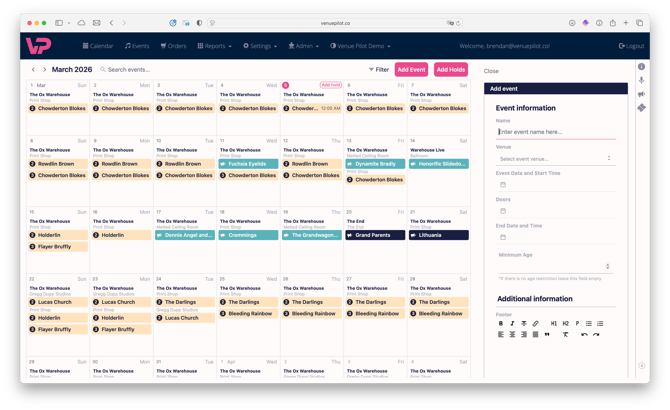
The updated Calendar is designed for clarity and efficiency, maximizing your control over scheduling operations.

#### **Key New Features:**
- **Full-Screen Utilization:** The calendar now occupies the entire screen, so you can see and do more.
- **Mobile Optimization:** The interface is fully optimized for mobile devices, making it easy to use, even on the go.
- **Direct Event Creation:** Users can now initiate the creation of a **hold or a confirmed event directly** from the calendar screen, in just a single click.
- **Workflow Efficiency:** New functionalities include the ability to **click and drag** to select multiple dates and advanced filtering by **any event status** (Hold, Confirmed, Scheduled, Live).

#### **Retained Functionality:**
- **Search and Filtering:** The search bar and filtering by status or date range remain available.
- **Status Indicators:** The color coding used to illustrate event status (Hold, Confirmed, Scheduled, Live) is **unchanged**, ensuring you can find what you're looking for.
#### **Quick Access Event Management:**
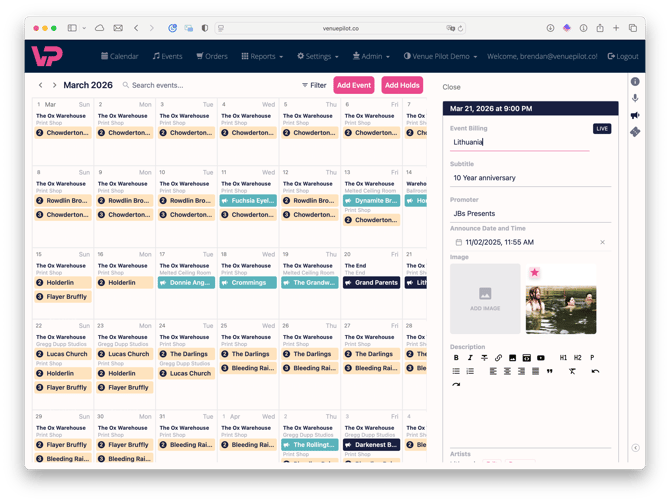
When interacting with a specific date, quick actions are available:
- **Direct Announce Access:** The **Announce/Publicity** button opens the announcement modal directly from the calendar view, so you can manage your public event listings directly from the home screen.
- **In-Modal Editing:** Within the announce modal, icons provide immediate access to:
- **Information Icon:** Allows users to **edit the event details** like date/time, venue, turning on Donations, and enabling PDF tickets.
- **Ticket Icon:** Directs users **to the management page** for building and administering event tickets.
- **Microphone Icon:** (coming soon) Add and manage artists and their links directly from the home screen
### The Updated Event Listings Page
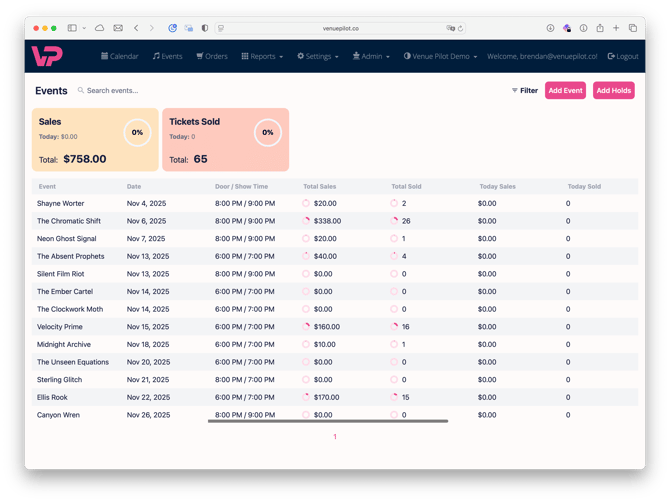
The revised Event Listings Page is built to make navigating your events fast and easy.
#### **Core Enhancements for Data Visibility:**
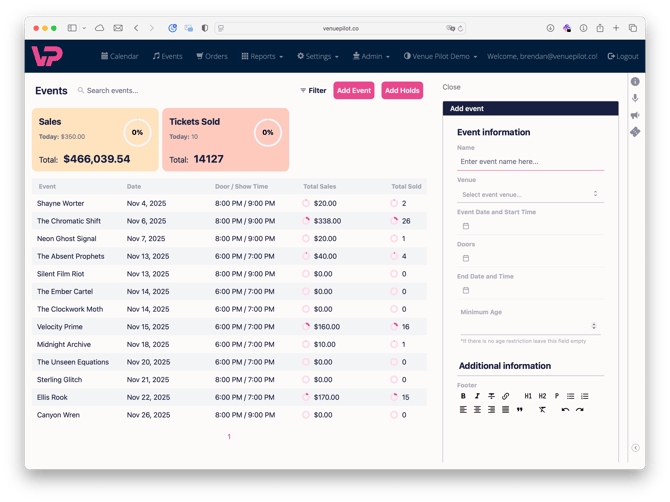
- **Condensed Scorecards:** The four previous scorecards have been consolidated into **two** scorecards at the top of the screen, displaying the same key metrics using significantly less screen space.
- **Single-Row Data Presentation:**
- Each event is presented as a **single row**.
- Users can **scroll horizontally** within the row to view numerous data points, including **status, published status, sales, and sales today**.
- Event details on the far left are fixed during horizontal scrolling, ensuring the user **always identifies the event** being reviewed.
- Subtle color variations between rows aid in tracking information across the screen.
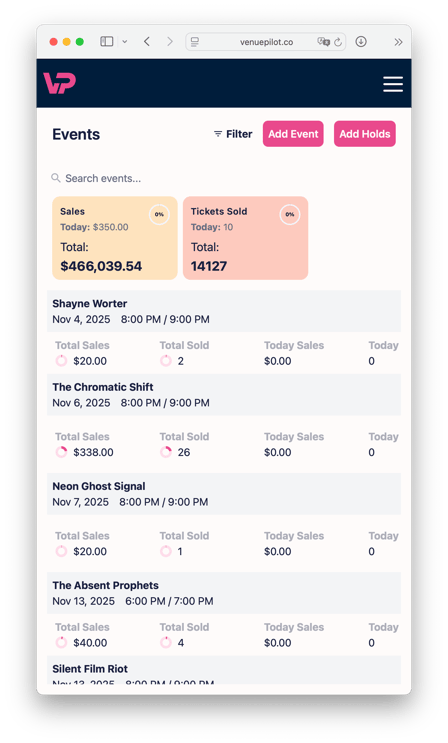
- **Seamless Mobile Experience:**
- In the mobile view, event information smartly **collapses into two lines**.
- Horizontal scrolling across all event statistics is possible without losing sight of the event title, providing a smooth and powerful mobile experience.
#### **Workflow and Filtering:**
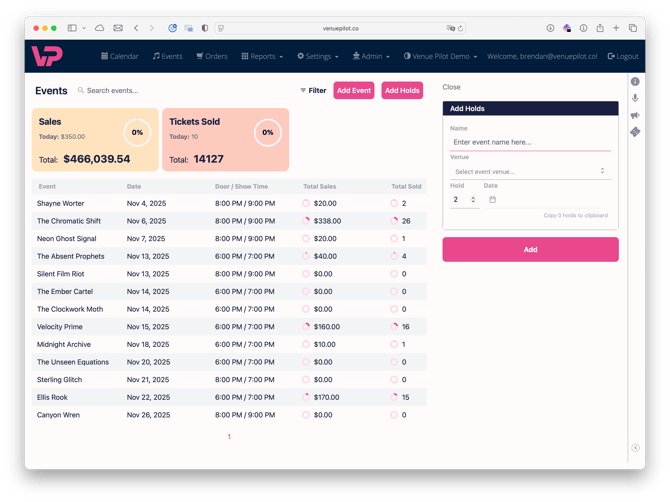
- **Unobstructed Creation:** Similar to the calendar, users can add an event or a hold **directly from this page**.
- **Filtering Options:** Standard filters for status (Hold, Canceled, Confirmed, etc.) are available. Users can filter by date range, including past events.
- **Default View:** The index defaults to displaying all events scheduled for **today and beyond**.
### What does this all mean? What's the plan?
These new screens are part of a broader, **platform-wide overhaul** as we migrate VenuePilot onto the latest, fastest technology. We are transitioning the platform piece by piece to deliver the best, modern user experience.
You may have already noticed elements of this modernization in other areas, including our updated **Announce Modal, Venue, Team, and Roles pages, the Box Office App, and the New Checkout flow.**
We plan to continue this migration across the platform. This effort is not only designed to make VenuePilot **faster and easier to use** but will also significantly enhance our capability to **iterate on new features and deploy updates faster than ever before.**
Questions, thoughts or suggestions? Please contact us at **info@venuepilot.co**.
- [Ticket Buyers](https://support.venuepilot.co/knowledge/ticket-buyers?hsLang=en)
- [Get Started with VenuePilot](https://support.venuepilot.co/knowledge/get-started-with-venuepilot?hsLang=en#main-content)
- [Onboarding](https://support.venuepilot.co/knowledge/get-started-with-venuepilot?hsLang=en#onboarding)
- [Calendar](https://support.venuepilot.co/knowledge/calendar?hsLang=en)
- [Manage Events](https://support.venuepilot.co/knowledge/manage-events?hsLang=en#main-content)
- [Email Confirmations](https://support.venuepilot.co/knowledge/manage-events?hsLang=en#email-confirmations)
- [Access & Discount Codes](https://support.venuepilot.co/knowledge/manage-events?hsLang=en#access-discount-codes)
- [Ticketing](https://support.venuepilot.co/knowledge/manage-events?hsLang=en#ticketing)
- [Event Management](https://support.venuepilot.co/knowledge/manage-events?hsLang=en#event-management)
- [Templates & Budgets](https://support.venuepilot.co/knowledge/manage-events?hsLang=en#templates-budgets)
- [Marketing](https://support.venuepilot.co/knowledge/marketing?hsLang=en#main-content)
- [Pixels](https://support.venuepilot.co/knowledge/marketing?hsLang=en#pixels)
- [Box Office & Scanning](https://support.venuepilot.co/knowledge/box-office-scanning?hsLang=en#main-content)
- [Box Office Reporting](https://support.venuepilot.co/knowledge/box-office-scanning?hsLang=en#box-office-reporting)
- [Selling](https://support.venuepilot.co/knowledge/box-office-scanning?hsLang=en#selling)
- [Scanning](https://support.venuepilot.co/knowledge/box-office-scanning?hsLang=en#scanning)
- [Reports](https://support.venuepilot.co/knowledge/reports?hsLang=en)
- [Hardware & IT](https://support.venuepilot.co/knowledge/hardware-it?hsLang=en)
- [Integrations](https://support.venuepilot.co/knowledge/integrations?hsLang=en)
- [Website integrations](https://support.venuepilot.co/knowledge/website-integrations?hsLang=en)
- [VenuePilot University: Producing and Managing Independent Events](https://support.venuepilot.co/knowledge/venuepilot-university-producing-and-managing-independent-events?hsLang=en)
- [Announcements](https://support.venuepilot.co/knowledge/announcements?hsLang=en)
[](http://venuepilot.com)
[mailto:info@venuepilot.co](mailto:info@venuepilot.co)
Copyright © 2026, VenuePilot