---
title: Canceled Event Report
description: If an event has changes, such as a new date or different talent, it may be necessary to process refunds for tickets. This report will assist you in reconciling and refunding tickets and orders.
---
[Skip to content](https://support.venuepilot.co/knowledge/cancelled-event-report#main-content)
English
Show submenu for translations

Open main navigation
Close main navigation
- English
Show submenu for translations
- Contact us
Contact us
Search our Knowledge Base
- There are no suggestions because the search field is empty.
1. [VenuePilot Support](https://support.venuepilot.co/knowledge?hsLang=en)
2. [Reports](https://support.venuepilot.co/knowledge/reports?hsLang=en)
# Canceled Event Report
## If an event has changes, such as a new date or different talent, it may be necessary to process refunds for tickets. This report will assist you in reconciling and refunding tickets and orders.
### Canceled Event Report
**⛔Still need to cancel your event?**
You can view our **["I Need to Cancel an Event"](https://support.venuepilot.co/knowledge/cancel-an-event?hsLang=en)** knowledge base article
- Navigate to your **CALENDAR TAB and adjust the STATUS FILTER** in the top left next to the 🔍
- Remove all other **statuses besides CANCELLED**
**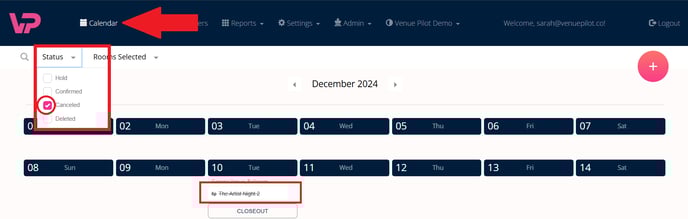**
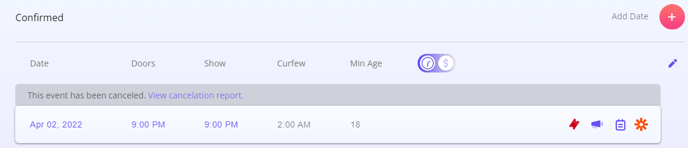
- **Click into the canceled hold** for which you would like to see a report.
- Inside the hold, you will now see an option for **"View Cancelation Report."**
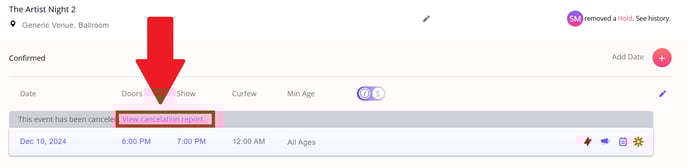
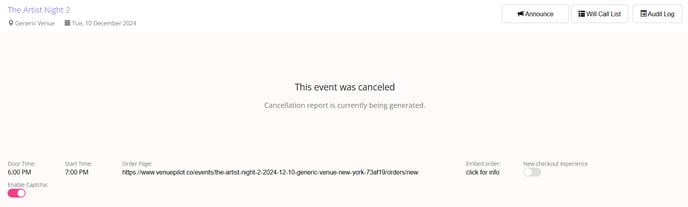
- Here, you will find a list with the **names and emails for everybody who purchased a ticket.**
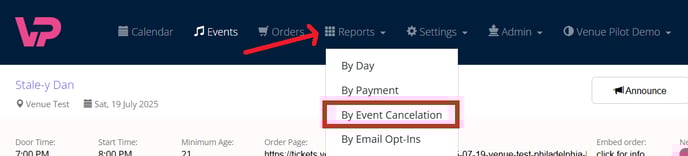
- You can also access this report via the **REPORTS TAB across the top of your screen** and choosing **By Event Cancellation from the sub-menu**.
- You will be taken to a **calendar where you can fill in the date range to find your canceled event.**
🆘Still need help? Reach out to us @ **clientsupport@venuepilot.co**
- [Ticket Buyers](https://support.venuepilot.co/knowledge/ticket-buyers?hsLang=en)
- [Get Started with VenuePilot](https://support.venuepilot.co/knowledge/get-started-with-venuepilot?hsLang=en#main-content)
- [Onboarding](https://support.venuepilot.co/knowledge/get-started-with-venuepilot?hsLang=en#onboarding)
- [Calendar](https://support.venuepilot.co/knowledge/calendar?hsLang=en)
- [Manage Events](https://support.venuepilot.co/knowledge/manage-events?hsLang=en#main-content)
- [Email Confirmations](https://support.venuepilot.co/knowledge/manage-events?hsLang=en#email-confirmations)
- [Access & Discount Codes](https://support.venuepilot.co/knowledge/manage-events?hsLang=en#access-discount-codes)
- [Ticketing](https://support.venuepilot.co/knowledge/manage-events?hsLang=en#ticketing)
- [Event Management](https://support.venuepilot.co/knowledge/manage-events?hsLang=en#event-management)
- [Templates & Budgets](https://support.venuepilot.co/knowledge/manage-events?hsLang=en#templates-budgets)
- [Marketing](https://support.venuepilot.co/knowledge/marketing?hsLang=en#main-content)
- [Pixels](https://support.venuepilot.co/knowledge/marketing?hsLang=en#pixels)
- [Box Office & Scanning](https://support.venuepilot.co/knowledge/box-office-scanning?hsLang=en#main-content)
- [Box Office Reporting](https://support.venuepilot.co/knowledge/box-office-scanning?hsLang=en#box-office-reporting)
- [Selling](https://support.venuepilot.co/knowledge/box-office-scanning?hsLang=en#selling)
- [Scanning](https://support.venuepilot.co/knowledge/box-office-scanning?hsLang=en#scanning)
- [Reports](https://support.venuepilot.co/knowledge/reports?hsLang=en)
- [Hardware & IT](https://support.venuepilot.co/knowledge/hardware-it?hsLang=en)
- [Integrations](https://support.venuepilot.co/knowledge/integrations?hsLang=en)
- [Website integrations](https://support.venuepilot.co/knowledge/website-integrations?hsLang=en)
- [VenuePilot University: Producing and Managing Independent Events](https://support.venuepilot.co/knowledge/venuepilot-university-producing-and-managing-independent-events?hsLang=en)
- [Announcements](https://support.venuepilot.co/knowledge/announcements?hsLang=en)
[](http://venuepilot.com)
[mailto:info@venuepilot.co](mailto:info@venuepilot.co)
Copyright © 2026, VenuePilot