---
title: Add or Edit Tech, Production & Hospitality Info
description: Learn how to add additional costs and important settlement information to your holds
---
[Skip to content](https://support.venuepilot.co/knowledge/add-and-edit-additional-info#main-content)
English
Show submenu for translations

Open main navigation
Close main navigation
- English
Show submenu for translations
- Contact us
Contact us
Search our Knowledge Base
- There are no suggestions because the search field is empty.
1. [VenuePilot Support](https://support.venuepilot.co/knowledge?hsLang=en)
2. [Calendar](https://support.venuepilot.co/knowledge/calendar?hsLang=en)
# Add or Edit Tech, Production & Hospitality Info
## Learn how to add additional costs and important settlement information to your holds
***\*Note: [You'll need to make sure you have Added an Artist to your hold](https://support.venuepilot.co/knowledge/sync-artists-to-your-events?hsLang=en) before you will be able to access the Hospitality, Rider & Tech Info icon!***
### Hospitality Info & Rider
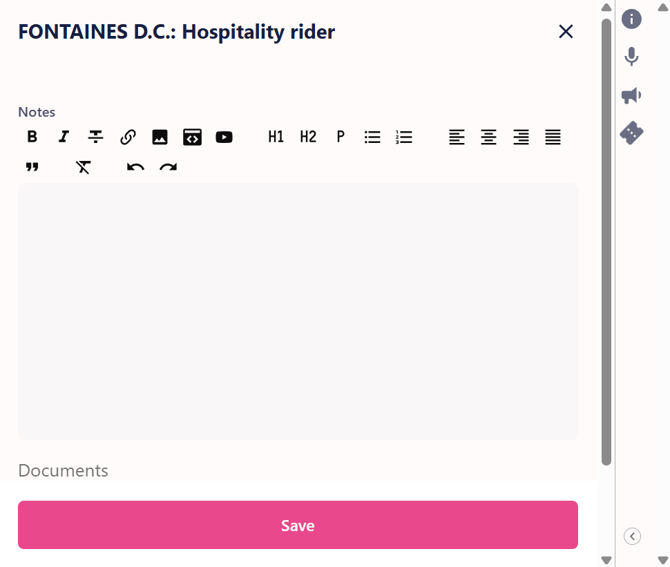
- When **viewing your hold, scroll down to the artist section and click on the "Hospitality" link** to open the hospitality rider.

- A window will pop up from the right side where you can either **type or paste in info, or upload a document.**
- Save your edits by clicking the **"Save"** button at the bottom before moving on.
****
### Tech/Production Info
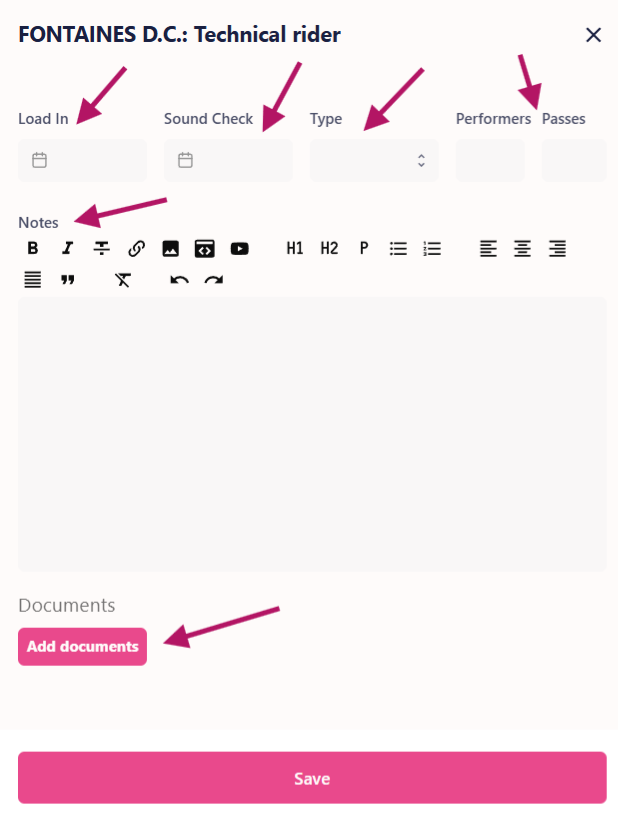
- Type or paste in text, or upload a tech rider directly to your hold or event.
- When **viewing your hold or event, scroll down to the artist section and click on the Tech button** to open the tech rider.

- A window will pop up from the right side where you can either **type or paste in info, or upload a document. **
- The event's production timeline and supplemental information can be entered as well. All information is editable in case it changes as the show comes closer.
- Save your edits by clicking the **"Save"** button at the bottom before moving on.
### **Ready to Confirm your Hold? Learn how:**
- **[Confirm a Hold](https://support.venuepilot.co/knowledge/confirming-a-hold?hsLang=en)**
- [Add Artist Info](https://support.venuepilot.co/knowledge/viewing-artist-info-in-the-calendar?hsLang=en)
- [Announce Your Event](https://support.venuepilot.co/knowledge/announce-publish-an-event?hsLang=en)
- [Publish Your Event](https://support.venuepilot.co/knowledge/publishing-a-venuepilot-event-to-your-website?hsLang=en)
🆘Still need help? Reach out to us @ **clientsupport@venuepilot.co**
- [Ticket Buyers](https://support.venuepilot.co/knowledge/ticket-buyers?hsLang=en)
- [Get Started with VenuePilot](https://support.venuepilot.co/knowledge/get-started-with-venuepilot?hsLang=en#main-content)
- [Onboarding](https://support.venuepilot.co/knowledge/get-started-with-venuepilot?hsLang=en#onboarding)
- [Calendar](https://support.venuepilot.co/knowledge/calendar?hsLang=en)
- [Manage Events](https://support.venuepilot.co/knowledge/manage-events?hsLang=en#main-content)
- [Email Confirmations](https://support.venuepilot.co/knowledge/manage-events?hsLang=en#email-confirmations)
- [Access & Discount Codes](https://support.venuepilot.co/knowledge/manage-events?hsLang=en#access-discount-codes)
- [Ticketing](https://support.venuepilot.co/knowledge/manage-events?hsLang=en#ticketing)
- [Event Management](https://support.venuepilot.co/knowledge/manage-events?hsLang=en#event-management)
- [Templates & Budgets](https://support.venuepilot.co/knowledge/manage-events?hsLang=en#templates-budgets)
- [Marketing](https://support.venuepilot.co/knowledge/marketing?hsLang=en#main-content)
- [Pixels](https://support.venuepilot.co/knowledge/marketing?hsLang=en#pixels)
- [Box Office & Scanning](https://support.venuepilot.co/knowledge/box-office-scanning?hsLang=en#main-content)
- [Box Office Reporting](https://support.venuepilot.co/knowledge/box-office-scanning?hsLang=en#box-office-reporting)
- [Selling](https://support.venuepilot.co/knowledge/box-office-scanning?hsLang=en#selling)
- [Scanning](https://support.venuepilot.co/knowledge/box-office-scanning?hsLang=en#scanning)
- [Reports](https://support.venuepilot.co/knowledge/reports?hsLang=en)
- [Hardware & IT](https://support.venuepilot.co/knowledge/hardware-it?hsLang=en)
- [Integrations](https://support.venuepilot.co/knowledge/integrations?hsLang=en)
- [Website integrations](https://support.venuepilot.co/knowledge/website-integrations?hsLang=en)
- [VenuePilot University: Producing and Managing Independent Events](https://support.venuepilot.co/knowledge/venuepilot-university-producing-and-managing-independent-events?hsLang=en)
- [Announcements](https://support.venuepilot.co/knowledge/announcements?hsLang=en)
[](http://venuepilot.com)
[mailto:info@venuepilot.co](mailto:info@venuepilot.co)
Copyright © 2026, VenuePilot